
Shipment Receipt Verification (SRV) allows sites to require a two-user receipt process when receiving inventory, but also the ability to override the verification in certain instances. The most common method used is technician entry and pharmacist verification, but other sites have approved a tech performing both entry and verification as long as the verifying user is another technician.
Both users will appear on the DARF when this feature is used.
| Two User Entry | Self Verification | Overridden Verification |
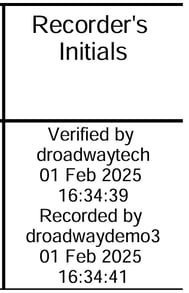 |
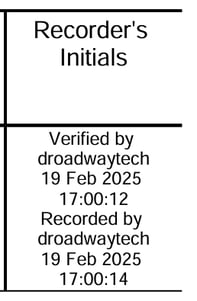 |
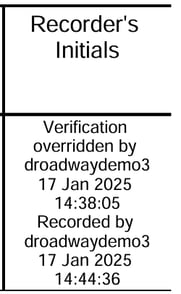 |
Important considerations for Vestigo's Shipment Receipt Verification:
- Shipment Verification and Override will only apply to FULL tracking Drug Builds.
- Shipment Verification and Override does not currently apply to Send Out Inventory Receives
- Users who will need to be able to Verify and Override will need the permission on at least one user role. The two permissions are under the “Inventory” section, titled: VerifyShipmentReceipts and “OverrideShipmentReceiptVerification” (Application Administration – Manage Application Roles and Permissions).
- The Verification time stamp will always be before the recording time stamp. This is due to how verification works and the verification action is before the recording of the receipt.
- When shipment receipt verification is in use on the drug build, the user who enters the inventory line item is considered the recorder. The user who verifies/overrides the inventory is considered the verifying/overriding user. It is possible for the verifying user to complete the shipment after verification and the recorder is still the person who enters the line item
- When Shipment Verification or Override is required, the shipment cannot be Completed until it is:
- Verified or overridden by the same user, if self-verification is allowed. OR
- Verified or overridden by a different user.
Tip - Prior to enabling this feature across all protocols, it is highly recommended to trial this feature in couple of fast moving protocols to ensure you have all the workflows defined.
Permissions Related to Shipment Receipt Verification
VerifyShipmentReceipts - Ability to Verify Shipment Receipts
OverrideShipmentReceiptVerification - Ability to Override Shipment Receipt Verifications
ManageShipmentReceiptVerificationOverrideReasons - Ability to create, edit, and delete Shipment Receipt Verification Override Reasons.
Contents
Application Administration Setup
Vestigo Shipment Receipt Verification and Override functionality must be initially set up in Application Administration before using the functionality. A site can establish shipment verification and override at the facility level thereby allowing each facility to create or modify existing workflows to accommodate the verification step. Sites can also choose to automatically toggle on the setting on new protocols built after the option has been set.
Users will need to complete the initial setup in App Admin in this order:
- Sites need to determine who can verify or override shipment receipts and then add the appropriate permissions to the application roles. See this article about modifying application roles.
- The site will need to create at least one override reason. See this article about managing Shipment Receipt Verification Override Reasons.
- Establish the facility settings for each facility. See this article about the Facility Shipment Receipt Verification settings.
Protocol Setup
Once the above is done and depending on the facility setting, sites may only choose to enable Shipment Receipt Verification (SRV) on new studies going forward. If sites choose to enable the setting on existing protocols, they may want to consider creating a NTF for facility documents about the process change and on which day it changed.
Local Tab
The first protocol setting relating to SRV is visible on the Local tab of Edit Protocol, labeled as Requires Shipment Receipt Verification to be set on Drug Builds. This is a radio option, and existing protocols will have this option set to no. Turning this setting on will require that the drug builds have Shipment Receipt Verification turned on. Setting this option to on is not required if you only want some drug builds to require SRV.
If any drug builds are not updated to require verification, users will be presented with a validator when they proceed to the Shipment Receipt screen.

Drug Builds
Under each drug build (Edit Protocol > Drugs and Orders Tab > Edit Drug Build), there are additional settings that can be toggled.

Existing drug builds will likely not have the Shipment Receipt Verification flag checked. Once it is checked, additional settings appear related to Self-Verification. Sites can opt to not allow Self-Verification, and no other further settings need to be modified on the drug build. Ensure you save any changes and new receipts going forward will required SRV.
If the site opts to allow Self-Verification by checking the flag, an additional option will appear. The site can optionally apply a timer to allow Self-Verification. The value is in minutes. If the timer is set to 0, the user will be able to self-verify instantly during receipt.
Regardless of Self-Verification, any user with the Override Permission can override the verification at any time.
Enabling the Shipment Receipt Verification across Multiple Protocols
If you have trialed out SRV at your site and you are wanting to apply this setting across all protocols, please reach out to Vestigo Support to learn how we can assist.