Vestigo allows sites to establish inventory locations at the facility level to help maintain control and clean records for their protocols. Because Inventory locations are such a critical component of Vestigo, we have broken up articles relating to Parent/Parent and Parent/Child Locations and this article covers understanding each set and the use cases.
- Understanding Parent/Parent Inventory Locations
- Understanding Parent/Child Inventory Locations
- Managing Parent/Parent Inventory Locations (opens in a new window)
- Managing Parent/Child Inventory Locations (opens in a new window)
Things to consider for creating and managing inventory locations within Vestigo
-
Location names should be unique and easily identifiable when reviewing any data in Vestigo.
-
It is best practice to avoid setting up inventory locations with the same location name across facilities. If you have similar named fridges across facilities, consider establishing a nomenclature to help define the locations. eg: IDS Fridge 1, CC Fridge 1, Park Fridge 1, etc.
-
Once a location has been set and used, the name of the location should never be changed unless to correct a spelling mistake or add an additional identifier. Changing the name will impact all previous records where the location was used on with inventory.
- Once inventory location is established as a Parent/Parent or Parent/Child locations, they should not be modified to make them the other type of storage location. In some situations, it may be possible to go from Parent/Parent to Parent/Child. However, we strongly suggest you contact support prior to making any changes.
Understanding Parent/Parent Inventory Locations
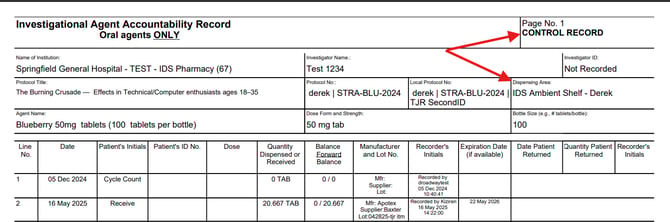
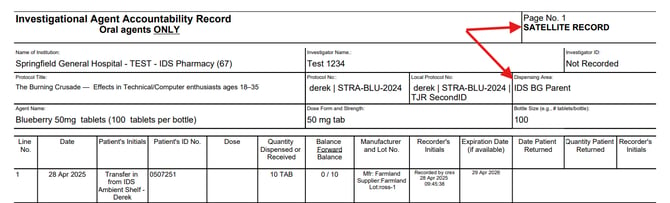
By default, all locations created will start as a Parent/Parent location. This means that each location will have its own DARF and if inventory is moved from the control location of a drug to a secondary location, the secondary location will be listed as a satellite location. If inventory was only ever received into the control location, you will only have a control DARF.
An example of the DARF when inventory is received into a location that is Parent/Parent location and the location is the control location on the drug build.
An example of the DARF when inventory is received into a location that is Parent/Parent location and the location is not the control location on the drug build.
Understanding Parent/Child Inventory Locations
The Parent/Child inventory locations in Vestigo are designed to allow specific tracking of inventory down to discrete inventory locations but represent a collection of inventory locations as a single location for accountability purposes. Sites that typically use this function are NCI sites or sites that want to have more granular definition on individual locations within a single location.
For example – you have a room full of shelves. For inventory tracking, you want to identify each shelf separately so that it is easier to find things. Your parent location may be named IDS Ambient Shelf. Nested under that parent location, you may have additional locations named IDS Ambient Shelf 1, IDS Ambient Shelf 2, etc.
These would be considered Child or Receiving Locations and where the inventory is actually stored in Vestigo. When users generate the DARF at the protocol level, the inventory location filter will now only show the parent inventory locations and none of the child locations.
It is not recommended that you set up an entire IDS pharmacy as the parent location with multiple storage types listed underneath the parent location. The storage types should match the parent location.
When the DARF is run, all the transactions (receives, adjusts, dispenses) that were done in the child location will be rolled up to the parent location with a few exceptions:
- Transfers between a parent and child location or multiple children of one parent location will show on the parent location DARF. This will be illustrated on the DARF as a transfer OUT and transfer IN on the parent location DARF.
- DARF notes at the drug level (not tied to a specific inventory) will only be shown for Parent locations
- Cycle counts will show on the parent location DARF for the child location(s). If cycle counts are done on multiple inventories in multiple child locations, there will be line for each cycle count on the parent location DARF.
Examples of how the Parent/Child Location and Drug builds function in Vestigo
1. At the Drug build level, the control location is set to the Parent Location (green), while the Receiving location is set the child location (red).

2. When users are receiving inventory, the receiving location is populated as the default location to receive the inventory into.
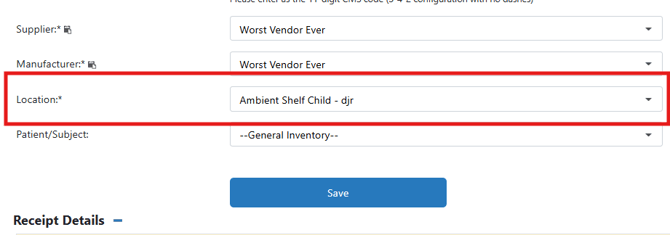
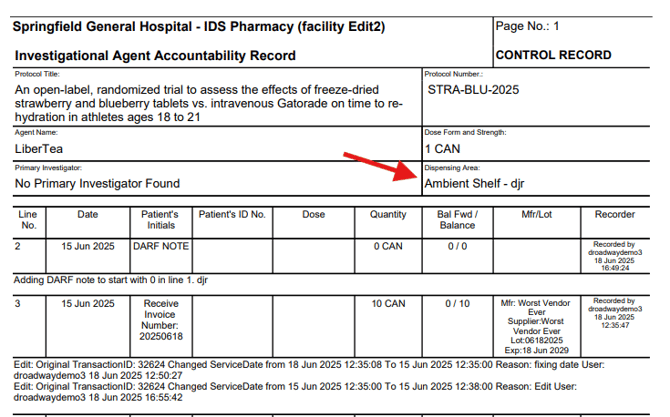
3. When reviewing the DARF, the Parent location will be listed as the dispensing area on the control record, even though the inventory was received into a Child location. If the inventory is transferred to another child location under the parent, you will maintain one Control Record DARF. If the inventory is transferred to another location that is not considered a Child Location, the new location will appear on a Satellite DARF.
Other areas that can be impacted by this Parent/Child locations
Temperature Documents
Temperature document containers should be created and maintained for the Parent location of the child inventories. When you upload a document into the Parent Location, those documents flow to protocols where the inventory is stored in a child location of the parent. This eliminates the need for multiple child inventory location temperature document containers.
For example: If you have Ambient Shelf as the parent with multiple locations nested under it, like Ambient Shelf Rack A, Ambient Shelf Rack B..., you would create and manage a Temperature Document container for Ambient Shelf.
Cycle Counts
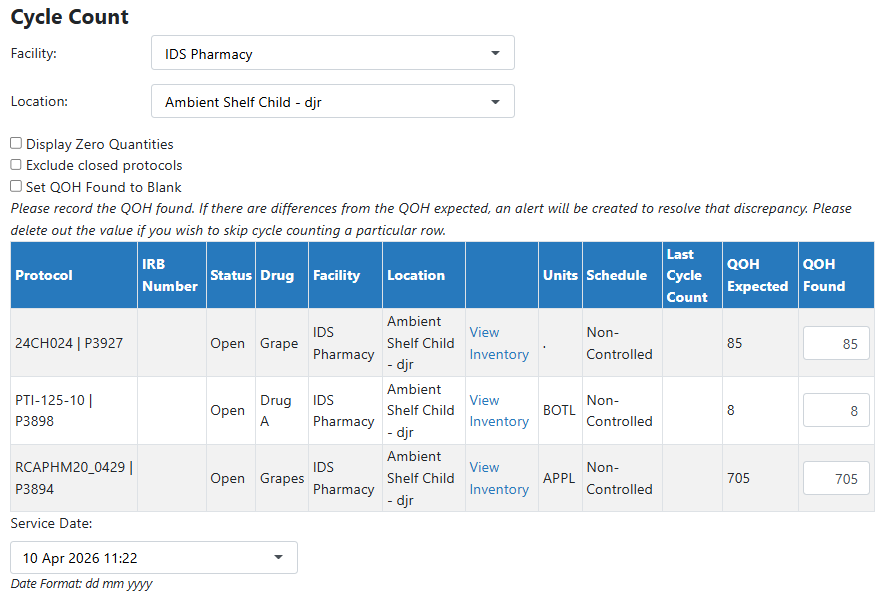
Cycle Counts still need to be performed at the inventory location level. When you are selecting from the location drop down at the global cycle count level, you will want to ensure you are selecting the child inventory location. In some instances, sites do not store inventory in the parent location.
Temperature Excursions
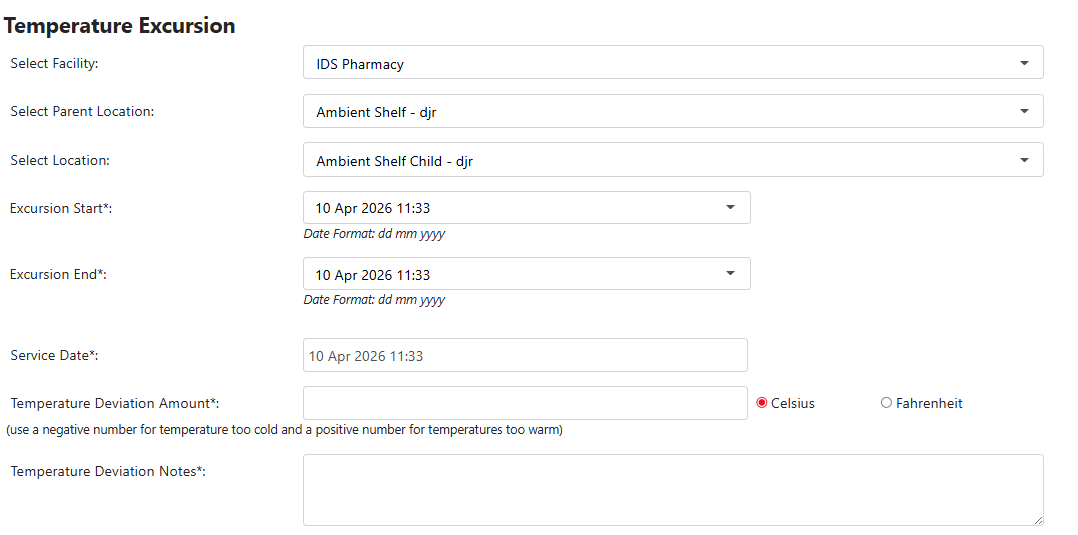
When recording a temperature excursion, you will have to select the Parent Location first, and then the Child Location. Any temperature excursion recorded against the Child Location only. If you have multiple Child Locations, users will have to record multiple temperature excursions.